

| Client | Funky Food Australia (funkyfood.com.au) |
|---|---|
| Industry | Rescued food / weekly meal box subscription |
| Platform | Shopify Plus |
| Engagement | Custom development — box builder, delivery eligibility logic, subscription flow |
Opens ChatGPT with this case study pre-loaded. No signup required on our site.
About Funky Food: The Brand & Mission
Funky Food is an Australian sustainable produce and weekly meal subscription brand operating on Shopify Plus. Every week, millions of kilograms of perfectly delicious, farm-fresh fruits and vegetables are discarded or rejected by major supermarkets simply because they don't meet rigid cosmetic standards for size, shape, or appearance.
Funky Food partners directly with local Australian farmers and growers to rescue this surplus and “quirky” produce, packing it into customizable weekly fresh boxes (from XSmall to Big) alongside rescued pantry essentials and cold-pressed juices. By delivering farm-to-door directly to households, Funky Food helps families save up to 40% compared to supermarket prices while preventing food waste at the source.
As order volume grew, managing postcode delivery zones, box customizations, and recurring subscriptions manually was creating operational bottlenecks. Aimbrill stepped in to automate their entire customer journey into one seamless, connected flow.
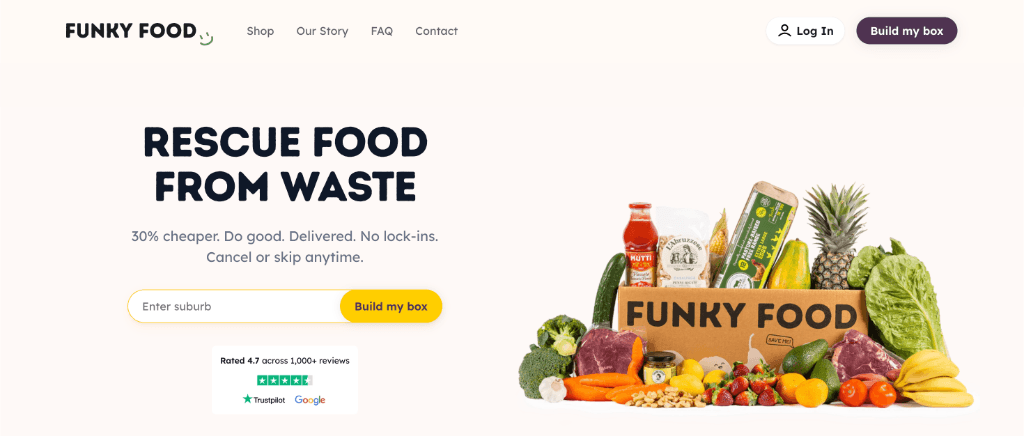
The Problem: A Growing Brand Outrunning Its Manual Operations
Demand was not the issue — operations were. Four specific things were breaking every week:
- Postcode rules were manual. Customers could order from suburbs outside the delivery zone. The team found out after payment, then cancelled, refunded, and explained the restriction to an already-frustrated customer.
- Box size was a guess. Shoppers did not know if they needed an XSmall or a Big box. Size questions, swaps, and exclusions were handled through support tickets, not the storefront.
- Add-ons broke the subscription cart. Off-the-shelf apps could not keep a recurring weekly box and one-time rescued pantry items in the same cart without checkout errors.
- Packing did not match the order. Warehouse staff worked from lists that were not reliably tied to what the customer actually selected, so boxes were corrected after the order was already paid for.
The brief was not “add a subscription app.” It was to build one flow where eligibility, box building, and delivery logic all agree with each other automatically, before an order is ever created.
The Customer Journey: Six Steps From Suburb to Subscription
This is the customer-facing flow Aimbrill designed and built, in the order a shopper moves through it:
1. Suburb / postcode gate
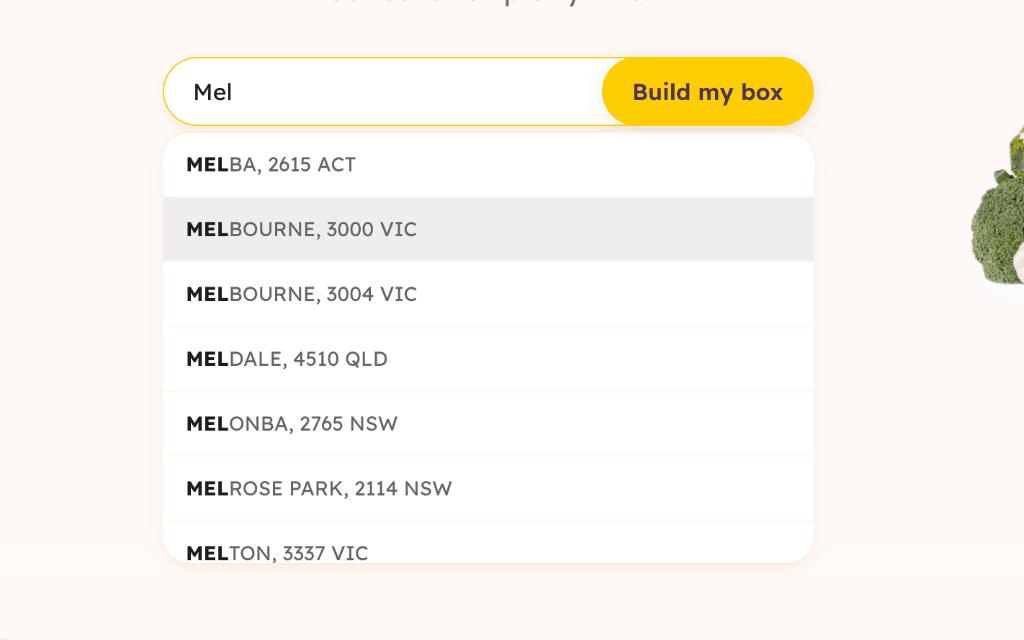
The customer enters their suburb before they can build a box. If the area is not on a courier route, they never reach checkout at all — invalid orders are stopped at the first screen instead of becoming a refund three days later.
2. Household size
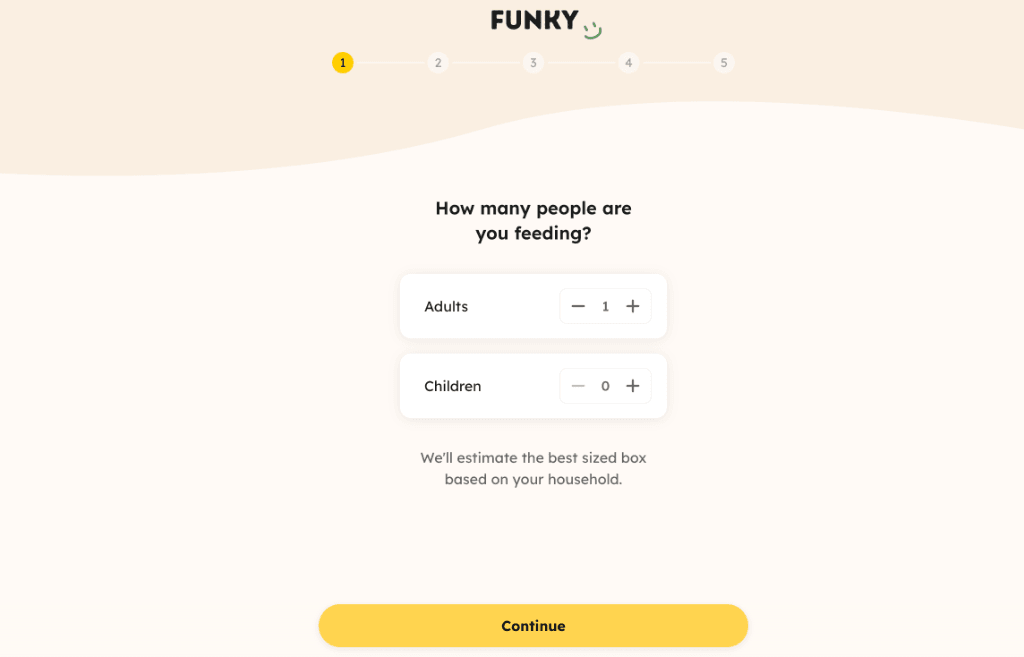
Adult and children counters recommend a box size (XSmall, Small, Medium, or Big) instead of asking the shopper to guess a SKU. This single step removed “which box is right for two people?” from the support queue entirely.
3. Weekly box + swaps
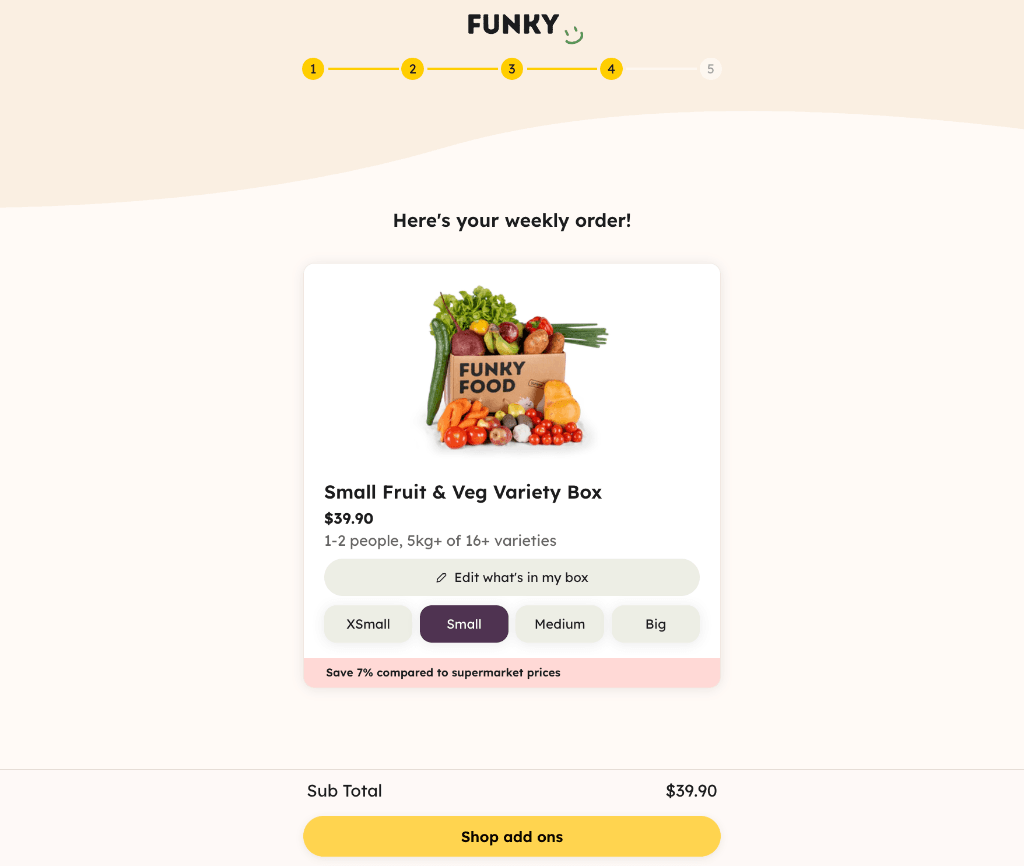
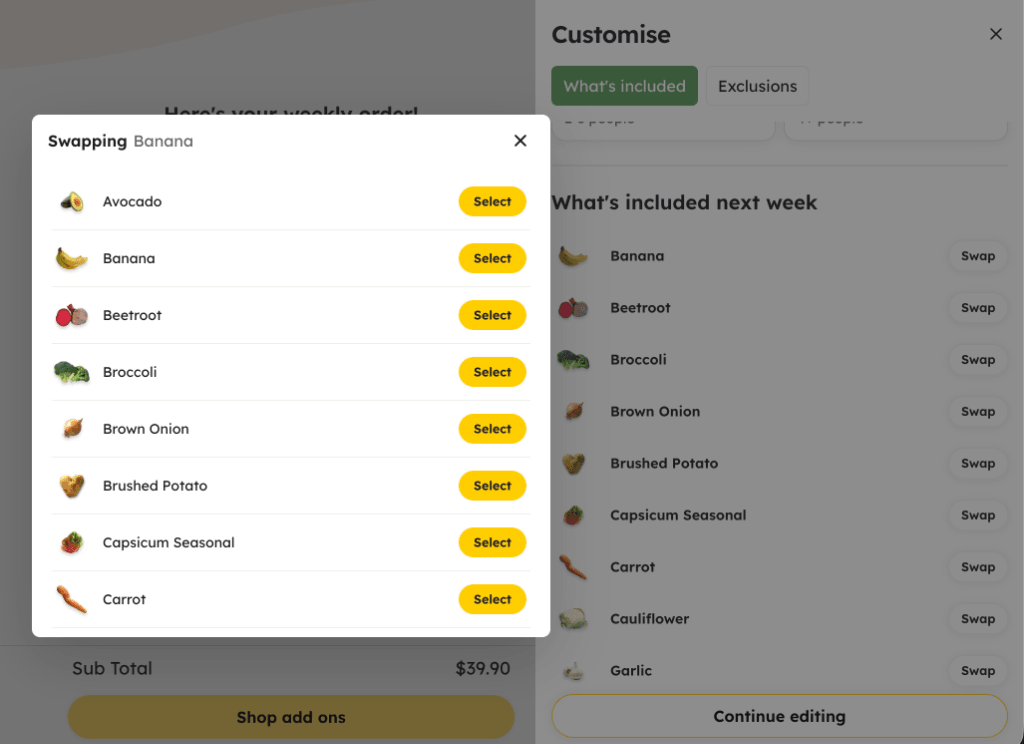
The customer sees next week's actual produce list and can change size, swap individual items, or set exclusions. The box stops being a mystery bag — they know exactly what's arriving before they pay.
4. Rescued add-ons
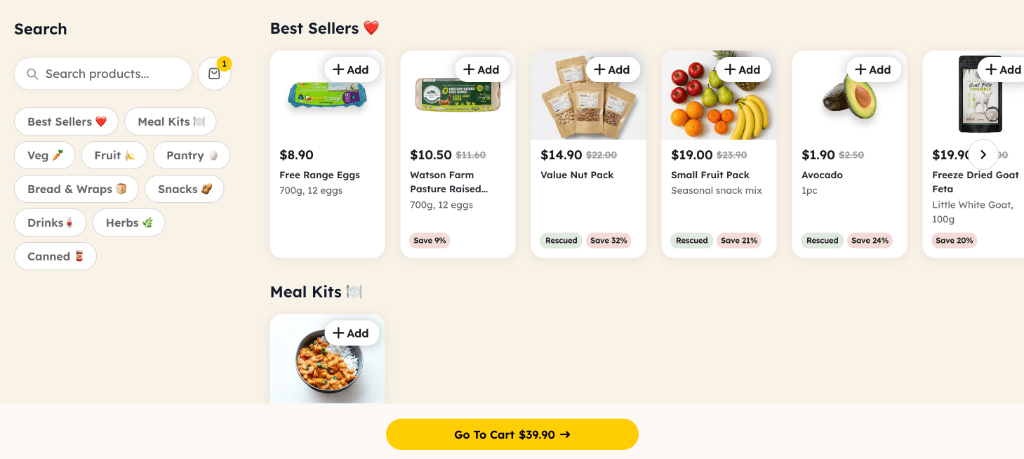
Once the weekly box is set, the customer can add rescued juice, pantry items, fruit, or veg — each tagged with a “Rescued” badge and a savings percentage versus supermarket pricing. These sit in the same cart as the recurring box, not a separate order.
5. Cart: delivery, frequency, savings
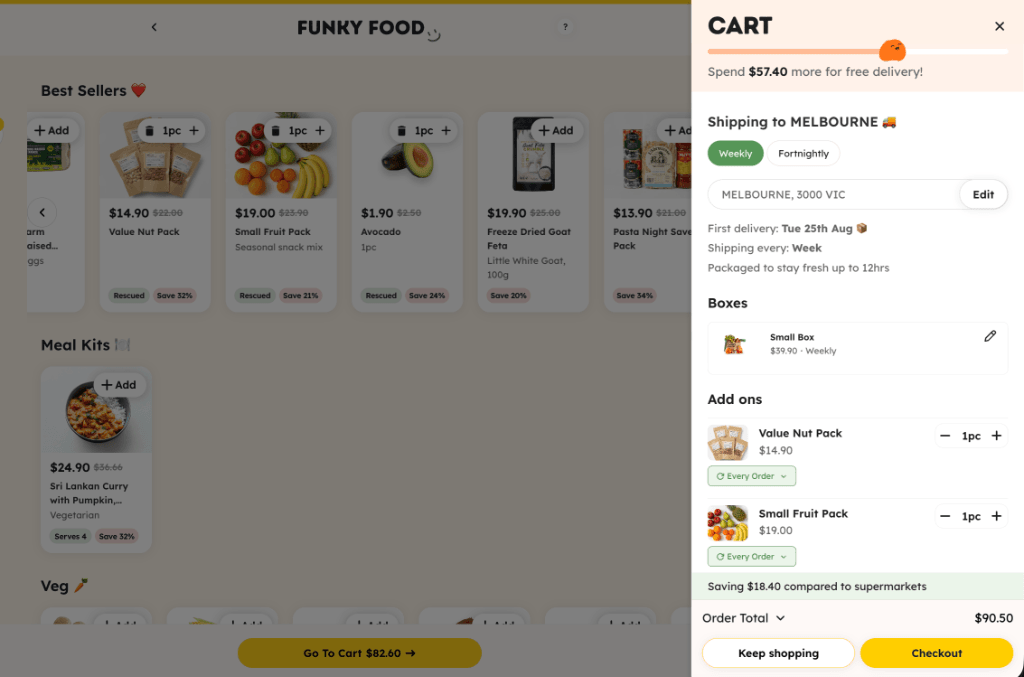
The cart re-checks the postcode, shows delivery frequency, a free-delivery progress bar, and total savings versus supermarket prices — all before checkout, so nothing is a surprise at the final step.
6. Recurring checkout
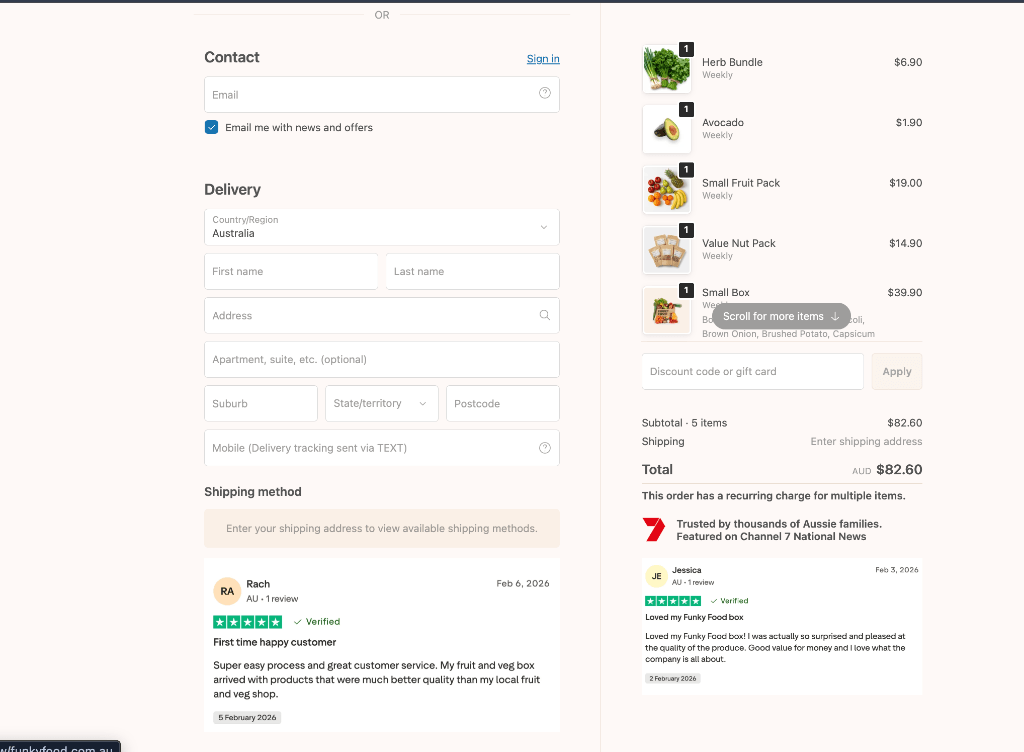
Checkout shows express payment options (Shop Pay, PayPal, Google Pay), customer reviews, the exact produce list for the upcoming box, and a clear “$X every week” line — so the customer can see this is a subscription, not a one-off purchase, before they commit.
Operational Outcome
Support stopped fielding “which size do I need,” staff stopped fixing orders after the fact, and ZIP-related refunds dropped to effectively zero — without adding headcount.
The Build Behind the Flow
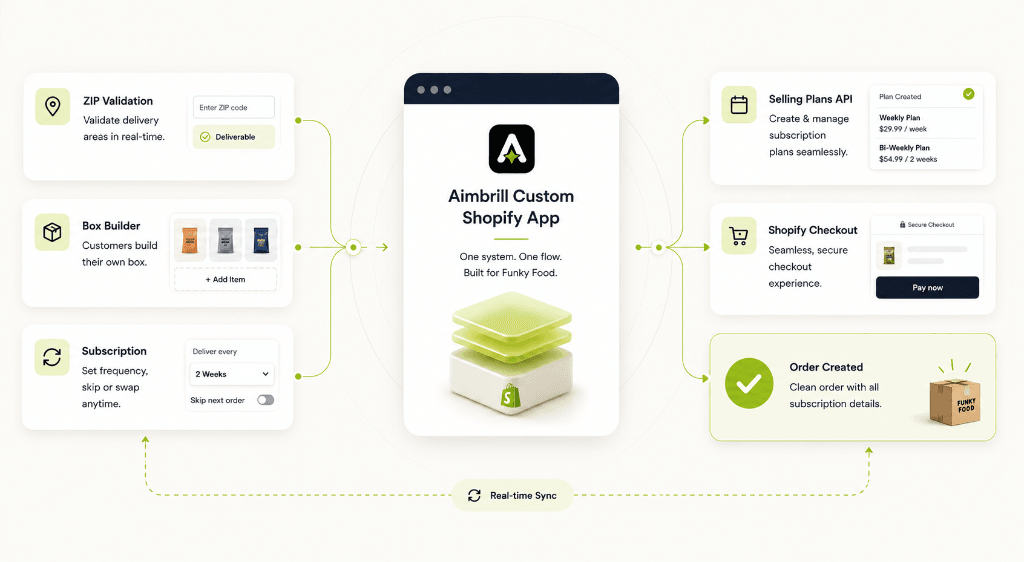
Rather than stacking multiple apps that each partially own ZIP rules, subscriptions, or bundling — a common failure pattern that causes checkout conflicts — Aimbrill built one custom system that owns the entire flow end-to-end.
One custom app
ZIP validation, box configuration, and recurring order logic all run inside a single custom app instead of competing storefront scripts. The same rule set is applied twice — once when the customer starts the journey, and again immediately before the order is actually created at native checkout — so nothing valid at step 1 can become invalid by checkout.
Line-item properties
Box size, item swaps, and exclusions are stored directly on the line item. The warehouse packing list can read exactly what a customer chose without needing a side spreadsheet — closing the gap between what was ordered and what got packed.
Native selling plans
The weekly box runs on Shopify's native selling plan infrastructure rather than a bolted-on third-party subscription widget. Checkout natively displays a recurring subtotal, and customers can skip or pause deliveries later through Shopify's standard customer portal — no complex custom account system required.
Checkout extensibility
Postcode and box contents are re-verified inside Shopify's native checkout extension framework immediately before the order is created. This enforces custom business rules inside checkout itself, not just in the front-end UI, so an out-of-zone suburb or an incomplete box cannot reach payment.
Why this matters for a brand evaluating an agency: this is the difference between installing separate apps and building a cohesive system. Apps that do not share data create exactly the kind of conflict Funky Food had before — a subscription app that does not know about a bundling app's rules. A custom build means every rule is enforced consistently, at every stage, by one source of truth.
Why the Flow Converts: The Design Decisions Behind It
Beyond the mechanics, several choices in this flow were made specifically to reduce hesitation at a point where subscription commitments typically cause drop-off:
- Eligibility is checked first, not last. Asking for a suburb before anything else means a shopper who cannot be served finds out in five seconds, not after filling in an entire order.
- Guesswork is replaced with guided input. Household-size counters turn an ambiguous decision into a simple, low-friction question, reducing cognitive load for a first-time buyer.
- Transparency before commitment. Showing the exact produce list, swap options, and savings percentage before checkout addresses the biggest hesitation point in food-box subscriptions: not knowing what you are actually going to receive.
- Progress and reward framing in cart. A free-delivery progress bar and running savings total reframe the cart from “here's what you are spending” to “here's what you are saving” — a well-established pattern for reducing cart abandonment.
- Subscription clarity at the exact moment of payment. Rather than burying the recurring nature of the purchase in fine print, checkout explicitly shows “$X every week” alongside reviews and press mentions, building confidence right when commitment-anxiety is highest.
None of these are visual polish — each maps directly to a specific point in the funnel where a hesitant shopper would otherwise drop off.
Issue → Solution at a Glance
| Issue | What Was Solved |
|---|---|
| Orders placed in non-delivery suburbs | Suburb/ZIP check at step 1, then re-verified in cart and checkout |
| Shoppers guessing their box size | Household step recommends XSmall → Big based on adults and children |
| No visibility into box contents before purchase | Weekly “what's included” list with swap and exclude options |
| Add-ons breaking the subscription cart | One unified cart for the weekly box and rescued add-ons |
| Staff fixing orders after payment | Validation rules run inside the app before the order is ever created |
| Checkout feeling risky for a recurring commitment | Reviews, express pay, and the recurring total shown clearly on checkout |
The Results
| Metric | Before | After |
|---|---|---|
| Manual ZIP/swap corrections | Handled via spreadsheet, ongoing weekly work | 0% — fully automated |
| Order errors (out-of-zone / incomplete boxes) | Recurring issue, caught after payment | Near 0 — blocked before the order exists |
| End-to-end flow | Fragmented across manual steps and multiple tools | One connected system, suburb check through delivery |
Is This Relevant to Your Brand?
This project is a useful reference point because it was not a simple storefront build — it required eligibility logic, dynamic product configuration, native subscription billing, and checkout-level validation to all work together without conflicting. If your brand has:
- A subscription or recurring-order model
- Delivery zones, eligibility rules, or geographic restrictions
- A product that needs to be configured or customised before purchase (box builders, bundles, quizzes)
- Operational work currently happening in spreadsheets instead of your storefront
...this is the type of system Aimbrill builds — one flow that owns the logic end-to-end, rather than several apps loosely stitched together.
Explore our related solution, the Meal Bundle Builder, or schedule a technical consultation with our engineering team.